


Create a Bundle
eSuite enables clients to create pre-defined bundles - a collection of several products - to sell as a single package, with a unique price and contract.
Introduction
Upon the creation of several products, clients can group those products together to form a bundled package, also known as a pre-defined bundle. While carts enable customers to create their own custom package by selecting several products to form a cart, a pre-defined bundle enables the client to do this on their behalf and retailing it as one package. A common use case for this is a print product and a digital product forming a 'Print & Digital Bundle', typically at a slightly cheaper rate.
Viewing Bundles
To view any pre-created product bundles, navigate to products in the main menu and select 'Product Bundles' from the sub menu. This will display 1 or more bundles configured, enabling you to make any changes, archive and toggle status.
Note: A bundle can only be deleted if there are no purchase records against that particular bundle.
Bundle Creation
Clients can create a bundle via API or eSuite HQ. For client-ease, the following will detail how to create a bundle via eSuite HQ.
Prerequisites
In order to configure a bundle, the following must be in place:
- Contracts - 1 or more contracts must be configured with the service type 'Bundle Purchase'
- Products - 2 or more products must be configured with the following:
- Product details (title, description, images etc.)
- Product status set to Active
- Price and currencies defined
- Issue schedule
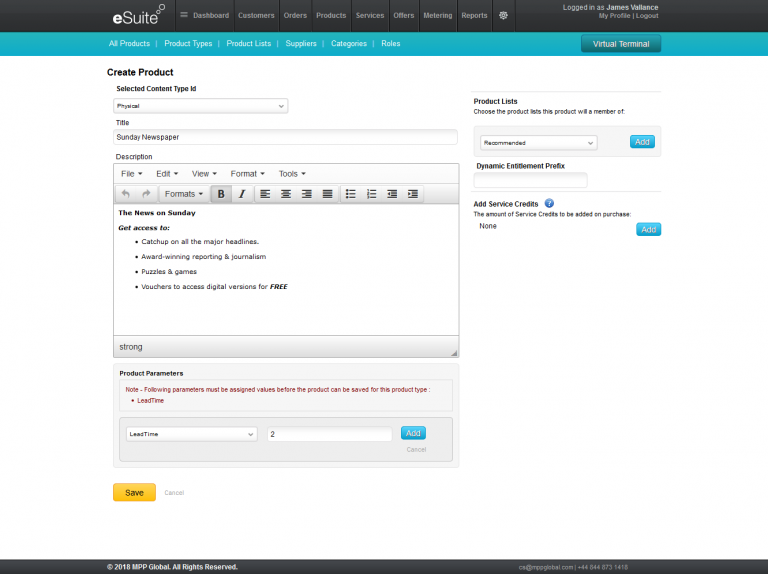
New Bundle
Providing the prerequisites are met, selecting the 'New Bundle' button from the Product Bundles tab, will enable you to craft a unique package and pricing. On this page, you an define the following generic bundle information:
- Status - by default, a bundle is automatically marked as 'Active'
- Name - the name of the bundle package, limited to 50 characters
- Bundle tag - a 4 character unique identifier for the bundle
- Description - the description of the bundle package, limited to 500 characters
Products
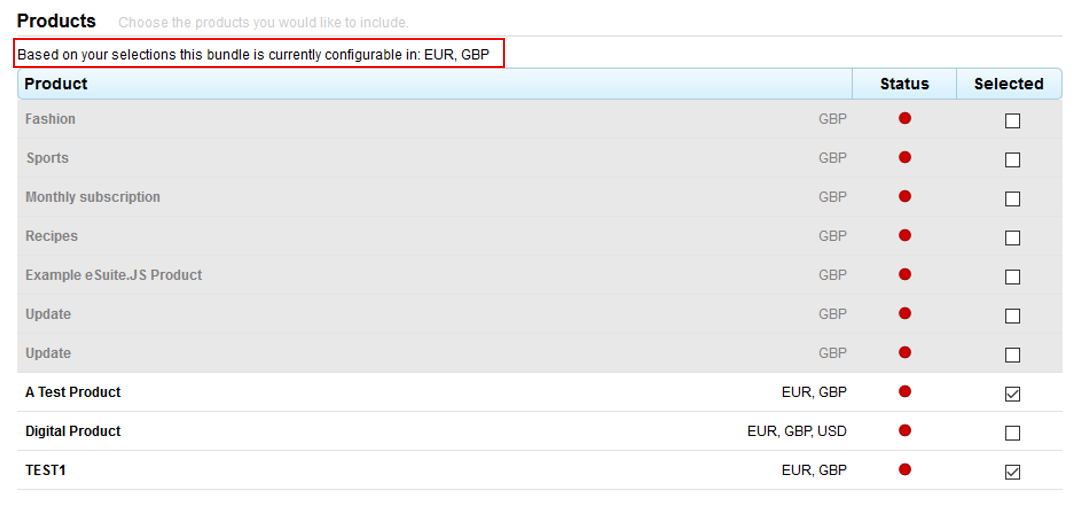
The products pane will display all valid products and all currencies (those with a product type of Physical or Digital only). There is no restriction on a maximum number of products that can be selected but before the client can proceed to the next step of the configuration process they must have selected at least 1 product.
Currencies - by selecting products from the list, the subtitle to the section then displays which currencies the bundle will be purchasable in. Products can only be selected if there are common currencies. The first product selected is what is used to find common currencies and must meet the same criteria. For example, if the client selects product A, which includes only GBP and then selects product B which includes GBP & EUR, then the only currency available for that package will be GBP. The UI intuitively keeps track of this, rendering any products non-selectable due to not having a common currency configured.
Frequencies (Contracts)
Once products have been selected, clients are able to select the pre-defined contracts (a service with the service type 'Bundle Purchase') in which they wish to make available for purchase. For example, clients may wish to select a weekly contract and a monthly contract. There is no restriction on the maximum number of contracts they can offer a bundle on, but at least 1 must be selected.
Reminder: a contract does not determine the price or the frequency in which the product is issued, the contract determines the billing terms of a subscription, for example, how often it renews, what payment methods are available, grace periods, free trials and so forth.
Pricing Matrix
The final stage of configuration is the pricing matrix to define the pricing for each product in a given bundle dependent on the frequencies (contracts) selected during setup.
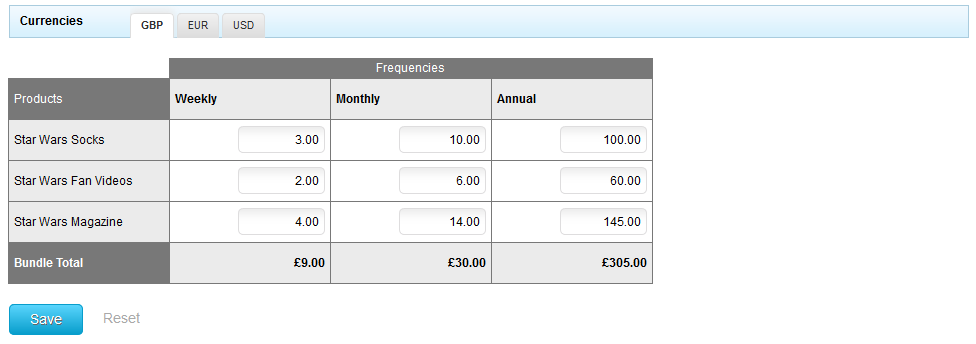
Above the matrix is a currencies tab, which enables clients to select the prices per contract in the currencies selected also during setup.
The matrix itself defaults the pricing set against the product across all frequencies. This is where clients can tailor the price to suit the bundle.
An example of this would be:
| Individual Product Pricing | |
|---|---|
|
Product A |
£10 |
|
Product B |
£10 |
| Bundle Package Pricing (incl. 10% discount) | |||
|---|---|---|---|
|
Products |
Weekly (cost / 4) |
Monthly (base price) |
Annually (cost x 12) |
|
Product A |
£2.25 |
£9.00 |
£108.00 |
|
Product B |
£2.25 |
£9.00 |
£108.00 |
|
Bundle Price |
£4.50 |
£18.00 |
£216.00 |
Note: that role based pricing is not supported for Bundle Purchase Subscriptions.
Purchasing a Bundle via Virtual Terminal
It is possible for a Support Representative to purchase a bundle on behalf of a customer using the Virtual Terminal within eSuite HQ.
There are currently 4 purchase flows within the Virtual Terminal: Ad-hoc Payment, Subscription, Product & Bundle.
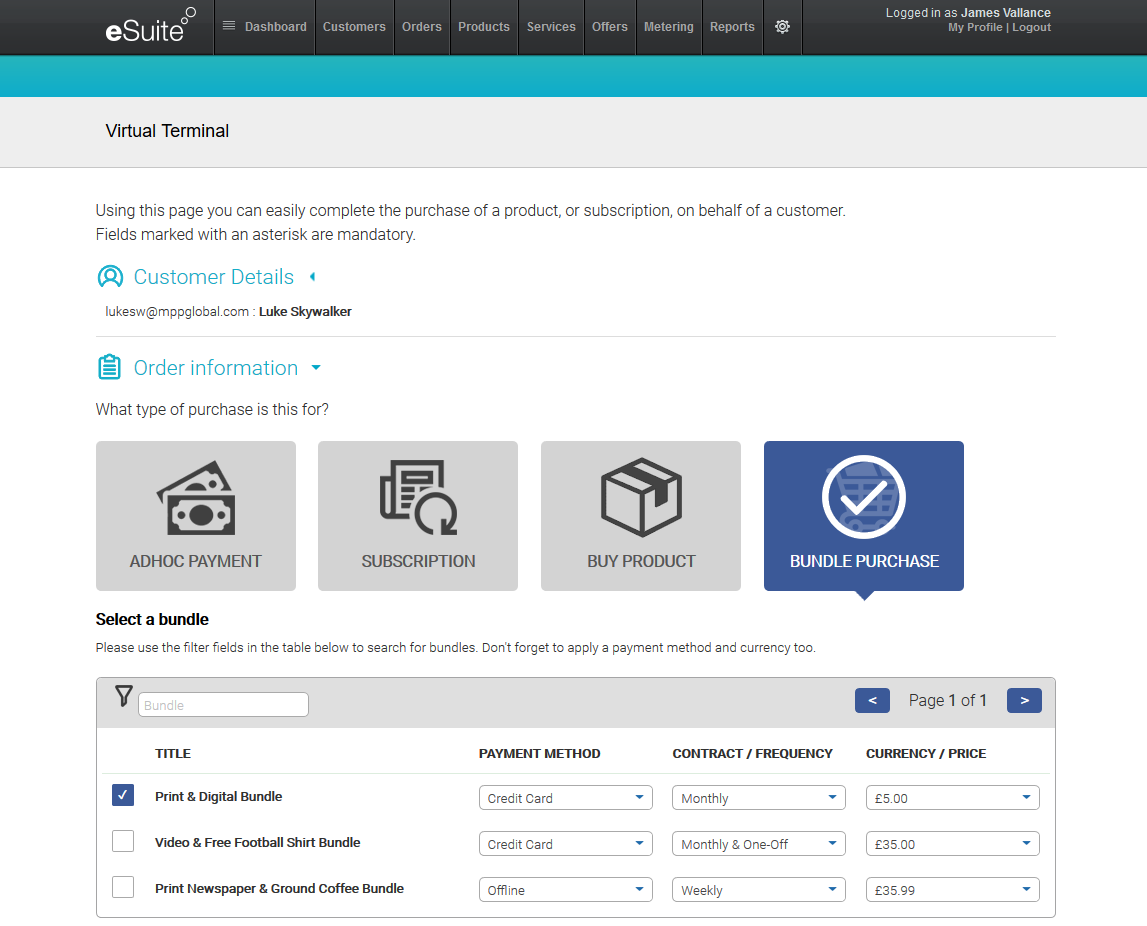
As per the other flows, the Bundle purchase flow is accessible via a new or existing account. By selecting the Bundle purchase flow, the table will display all available bundles, along with the payment method available, the contract and price across available currencies. Additional points of note include:
- Shipping Address: If physical products are present within the bundle being purchased, a shipping address will be required as part of the registration process. If the account already exists, then the Support Representative can select one of the existing addresses or create a new one.
- Virtual Terminal 2.0: The Bundle purchase flow is only available using the newer Virtual Terminal (2.0). To upgrade, please contact your Account Manager.
- Custom Parameters: As per the other flows, the Bundle purchase flow allows for custom parameters to be added for Account, Order, Subscription and Fulfillment.
Purchasing a Bundle via eSuite SDK
eSuite SDK version 5.0 comes with it's own Bundle product selection page, enabling clients to push customers directly to the bundles created and marked as active. To find out more, visit the SDK section.
Creating and Purchasing a Bundle via API
Using eSuite's API reference, developers are able to create, retrieve, update and delete a bundle.
This functionality will be made available in version 11 of eSuite API, currently in Beta, due to launch in March 2019. To access the Beta API, please contact your account manager.