


Registration with Janrain (Client Side)
Registration of an account when eSuite will be the secondary IDM with the primary IDM for the platform being Janrain. The Account Creation will be made directly from the browser into eSuite.
Description
When eSuite is the secondary IDM with Janrain as the primary IDM, eSuite will communicate and authenticate with Janrain using the Janrain Token passed in through the API. The values returned from Janrain are what are used within eSuite to create the account.
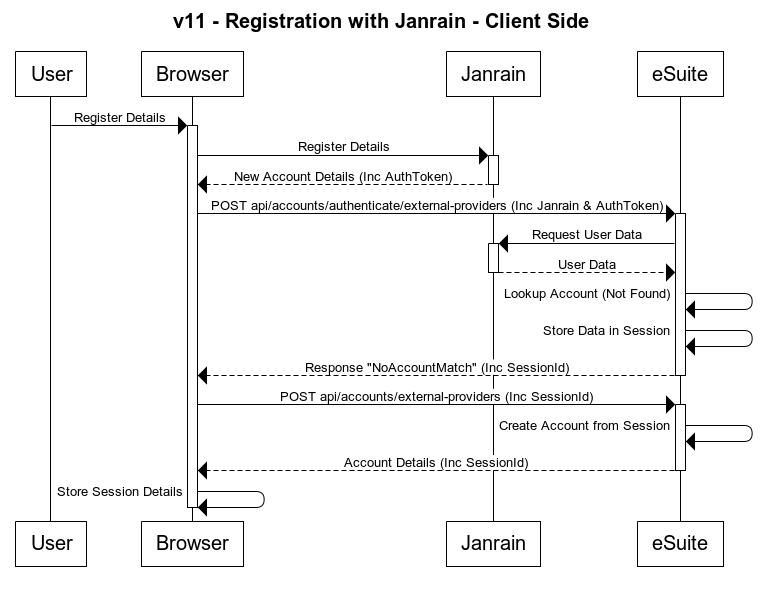
The diagram below shows Client-Side implementation of user registration flow using Janrain. When a new user is created on your platform they will first to be created directly within Janrain from the user’s browser.
Once the user is registered within Janrian, the browser will then call the eSuite Platform with the Janrain AuthToken. The initial call to the eSuite platform will determine if the users account already exists, during this check eSuite calls to Janrain with the AuthToken passed in to retrieve the account details stored in Janrain.
Once the account details have been returned from Janrain, eSuite uses these to look up the account. If the account is not found, then the data is stored in a session within eSuite and a response of NoAccountMatch is returned along with the Session ID where the account details are stored.
After a response of NoAccountMatch is returned from eSuite to the browser, the browser will need to make another call into the eSuite platform which is used to create the account within eSuite and link it to the Janrain account which was returned. This second call will pass in the Session ID which was returned from the initial call to pull back the account details provided by Janrain on the creation of the account.
Janrain Prerequisite
To enable communication between eSuite and the Janrain platform the following information needs to be provided to MPP Global.
- Janrain Application Name
- Janrain Application ID
- Janrain Application Secret
Once provided and registered within eSuite MPP Global will provide the following:
- MPP Application ID
These settings will need to be provided for both the UAT and Production environment as these will be different on Janrain's Sandbox and Production environments.
Workflow
Authentication
As these are a client-side API being called then client-side authentication is used for the API. API authentication method details can be found here: https://supportstaging.mppglobal.com/technical/esuite-rest-api-support/authenticating/eSuite Authentication Prerequisite
To enable the client side applications to call the eSuite Client Side API's you will need to provide MPP Global with the following:- A list of Origins
- Token ID
API Documentation
Details on the API used in this diagram can be found at the links below:
- api/accounts/authenticate/external-providers - https://dev.mppglobal.com/reference#accounts_byexternalproviderv11
- api/accounts/external-providers - https://dev.mppglobal.com/reference#accounts_addaccountbythirdpartyv11