


ネイティブ課金(アプリ内購入)
The eSuite Native Billing API allows clients to replicate accounts created via the app store purchase and build a profile directly into eSuite.
Overview
Services that offer their own billing such as iTunes and Roku tend to keep all information on payments hidden from clients. This includes information such as customer information, order details and renewal details.
The eSuite Native Billing API allows this information to be replicated within eSuite, creating a continuously updated subscription and entitlements.
Native Billing Flow
Whichever Native Billing provider is being used, the overall flow for users is the same:
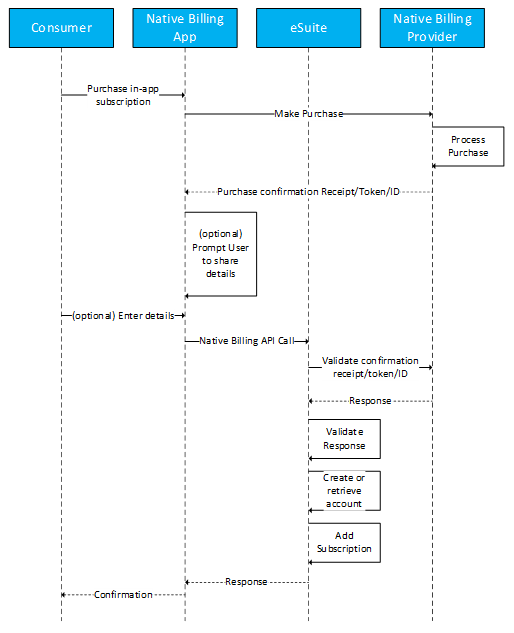
- Customer makes a subscription purchase on the App
- This flow assumes purchase is successful
- Purchase is completed, and Native Billing provider passes back a purchase confirmation. This differs depending on the provider. Some return a receiptID, others return a token and some return an orderID. This confirmation information is important to the Native Billing flow.
- If an account does not already exist for this customer in eSuite (this can be done prior to a native billing flow), the user is prompted to provide some customer information. This includes the following:
- First Name
- Surname
- Email Address
- Password
- The information gathered is used to create the Native Billing API call. When this call is made, eSuite takes the purchase confirmation receipt/token/orderId and validates it against the native billing provider.
- The provider responds with the validated purchase, which contains information about the subscription. eSuite then does the following:
- If an account does not exist (in the optional step in step 3), it will create an account using the passed details in the API call. Otherwise, it will retrieve the account.
- Using the information returned by the native billing provider, it will create a subscription in eSuite that mirrors the corresponding subscription purchased in the app
- Return a success response along with a session
- The Native Billing purchase journey is successful. The confirmation page is displayed in the app and the session returned by eSuite can be used to poll for entitlements.
Subscription Renewals
When a subscription is created using Native Billing, the start and end dates of the Native Billing Subscription are used when creating the eSuite subscription, meaning they will renew at the same time. The purchase confirmation is stored in the database against the subscription and is used for renewals. When the eSuite subscription reaches renewal, eSuite will take the purchase confirmation receipt, token or orderID and validate it against the Native Billing Provider. When the Native Billing provider responds, it contains the latest information of the Native Billing Subscription. eSuite validates this information to see if the subscription has renewed, lapsed or is yet to renew and actions on it appropriately by renewing, lapsing or putting the eSuite subscription into retry.
Subscription Cancellations
As Native Billing Subscriptions exist outside of eSuite, they are managed outside of eSuite. Some Native Billing Providers have a cancellation period for their subscription (for example, iTunes has a 14 day cancellation period). If this occurs, the Native Billing provider does not inform eSuite that this cancellation takes place. As a result of this, eSuite will poll the Native Billing Provider daily and check for these cancellations. If a cancellation is detected, eSuite will cancel the eSuite subscription, ensuring synchronisation between eSuite and the Native Billing Provider. If no cancellation is detected, the eSuite subscription will continue as expected.
Reconciliation
To support reconciliation of 3rd party solutions, our standard subscription and order reports include the identifiers for each of the Native billing solutions.
The reports which can both be found in the Data Feeds category:
- Order Report v13
- Subscription Data Feed v10
Current Restrictions
The following restrictions currently apply:
- eSuite does not support changing subscriptions on the Native Billing provider or eSuite for Native Billing subscriptions. Customers who purchase subscriptions using Native Billing should not be offered the opportunity to change their subscription.
- As iTunes controls the subscription and eSuite acts as a mirror of that subscription, changes made to the subscription on eSuite will not be reflected in the Native Billing Subscription. For example, a Native Billing subscription that has been cancelled in eSuite HQ without receiving a cancellation notification from iTunes will not be cancelled in iTunes and will still charge the customer.
- eSuite does not distinguish multiple eSuite defined subscriptions that have been allocated the same Native Billing Subscription ID. Therefore, each Native Billing subscription must have a single corresponding eSuite subscription.
- iTunes Native Billing can only be used for a single subscription per customer. If an iTunes receipt is received with multiple active subscriptions within, the API will fail.
- Prices and currencies displayed on orders in eSuite may not accurately reflect payments made in the Native Billing Provider.
- MPP Global will only ever use the relevant API's needed to retrieve order information and the parameter values required to make those calls. How these parameter values are acquired are the responsibility of the developers of the app. MPP Global cannot offer advice on app development.