


Google Play Native Billing
The eSuite Native Billing API allows clients to replicate accounts created via the Google Play app store purchase and build a profile directly into eSuite.
Overview
The eSuite Native Billing API enables subscription, customer and renewal information from Google Play to be replicated within eSuite, creating a continuously updated subscription and entitlements.
Google Play & eSuite Setup Prerequisites
To use Google Play Native Billing, clients must first provide credentials to MPP Global to configure Native Billing for Google Play. The credentials are collected from the Google Developer Console for the app being used:
| Key/Value | Description | Optional |
|---|---|---|
| OAuth 2 ClientID | Google-Assigned OAuth 2 ClientId | No |
| OAuth 2 ClientSecret | Google-Assigned OAuth 2 secret password | No |
| App Name | The name of your app | Yes |
| AppID | Google-Assigned AppID | No |
| App Secret | Google-Assigned App Secret | No |
Configuring Subscriptions in eSuite HQ
To use Google Play Native Billing in eSuite, the subscription-service must first be configured in eSuiteHQ. It is recommended that the configuration of the subscription service matches the configuration of the Google Play Service (including pricing and contract length). Once this has been configured, the payment method of ‘Google Play’ will be available in the allowed payment methods selection:
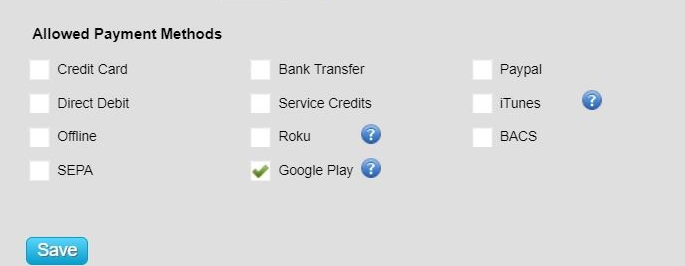
Once complete, the following parameters need to be set in the 'product parameters' for the service:
| Key/Value | Description | Optional |
|---|---|---|
| GooglePackageName | The package name for the app | No |
| GoogleProductId | The ID of the subscription | No |
After which, the subscription will be ready to be used for Native Billing.
Dynamic and Fixed-Price Services
For a fixed priced service, the price and currency that appears in eSuite will be the same that has been established in the service. If the service has muiltiple currencies then a currency can be passed in the request call.
For a dynamically priced service, the price and currency that appears in eSuite will default to the client preferred currency with a price of 0. However, the price and currency retrieved by Google will be used to populate the currency and price. The currency and price needs to be configured in the service.
Cancellation Behavior
There are 2 cancellation types passed to eSuite from Google upon the account being cancelled, these are:
- Soft Cancel - when a customer, or customer support on behalf of the customer, voluntarily cancels a subscription. This method disables auto renew against the subscription in eSuite and will terminate on the next renewal date.
- Hard Cancel - a hard cancel terminates access to the subscription instantly, and is typically triggered by the system, for example, when moving the customer to another subscription or revoked by a Developer.
Once the request to cancel and disable Auto Renew has been received by eSuite, the date in which the cancellation is triggered is stamped to the Subscription Data Feed report. This differs to the expiry date, surface in eSuite, which is the date the subscription is set to or has expired. eSuite's Cancellation Native Billing housekeeper frequency is set to check for cancellations every 60 seconds.
Using the eSuite REST API
Full API documentation can be viewed in the Native Billing section in the API reference.