


Amazon IAP Native Billing
The eSuite Native Billing API allows clients to replicate accounts created via the Amazon app store purchase and build a profile directly into eSuite.
Overview
The eSuite Native Billing API enables subscription, customer and renewal information from Amazon Appstore In-app purchase to be replicated within eSuite, creating a continuously updated subscription and entitlements.
Amazon IAP & eSuite Setup Prerequisites
To use Amazon IAP Native Billing, clients must first provide credentials to MPP Global to configure Native Billing for Amazon IAP. The credentials are collected from the Amazon Developer Console for the app being used:
| Key/Value | Description | Optional |
|---|---|---|
| Developer Secret | Amazon-Assigned secret Key | No |
| RVS Server URL | RVS server URL for Amazon IAP | No |
Configuring Subscriptions in eSuite HQ
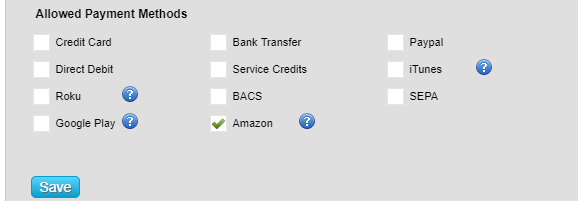
To use Amazon IAP Native Billing in eSuite, the subscription-service must first be configured in eSuite HQ. It is recommended that the configuration of the subscription service matches the configuration of the Amazon IAP Service (including pricing and contract length). Once this has been configured, the payment method of ‘Amazon IAP’ will be available in the allowed payment methods selection:
Once complete, the following parameters need to be set in the 'product parameters' for the service:
| Key/Value | Description | Optional |
|---|---|---|
| AmazonProductId | The unique ID for the product being purchased for the Subscription | No |
After which, the subscription will be ready to be used for Native Billing.
Dynamic and Fixed-Price Services
For a fixed priced service, the price and currency that appears in eSuite will be the same that has been established in the service. If the service has multiple currencies, then a currency can be passed in the request call.
For a dynamically priced service, the price and currency that appears in eSuite will default to the client preferred currency with a price of 0. It is recommended that you populate the currency and price from the product that has been created.
Using the eSuite REST API
Full API documentation can be viewed in the Native Billing section in the API reference.