


Fortumo Hosted DCB
Allows customers to initiate recurring and non-recurring subscription purchases using their mobile phone billing account as the funding source.
Introduction
Fortumo is a leading Direct Carrier Billing (DCB) payment service provider that has access to many different Carriers all over the globe for allowing customers to make purchases via their mobile phone billing account. Fortumo has multiple integration types that support a range of one-off and recurring subscription type purchase scenarios. For this integration type of Fortumo Hosted DCB both one-off purchases and recurring and non-recurring subscriptions can be purchased, where the consumer can select to pay via Fortumo Hosted DCB, enter their mobile phone number and then proceed through the necessary identity authorisation, and purchase completion steps within the Fortumo hosted payment pages.
Use Case
Where a customer wishes to make a purchase of a one-off item, recurring subscription or non-recurring subscription using their mobile phone billing account as the funding source for the initial and ongoing payments.
Key Functions
- Customers can make purchases using their mobile phone number as the funding source for the payment.
- Fortumo Hosted DCB uses the eSuite Alternative Payment Connector (APC) framework.
- Fortumo Hosted DCB is an asynchronous payment method that presents the Fortumo hosted payment pages with the relevant payment terms displayed, and the ability to capture the customers mobile phone number and complete the associated payment.
- Fortumo handles the authentication of the customer via an SMS message, One-Time Passcode (OTP) authorisation or some alternative authentication method to approve the payment.
- Purchases can be initiated via the POST /api/workflows/purchases/subscriptions REST API endpoint.
- Purchases can be completed via the PATCH /api/workflows/purchases/subscriptions REST API endpoint.
- Purchases can be initiated via the POST /api/accounts/{accountReference}/subscriptions REST API endpoint.
- Purchases can be completed via the PATCH /api/accounts/{accountReference}/subscriptions REST API endpoint.
- Fortumo Hosted DCB uses a callback notification to eSuite to confirm the payment result (i.e. success or failure) and update the Order status to Completed, Unpaid or Cancelled.
- The PATCH request is mandatory to complete the two-step purchase process, and create the required subscription and entitlement records within eSuite.
- Fortumo Hosted DCB supports free and discounted trials, and subscription offers applied at the point of purchase.
- Fortumo manages both the schedule and amount of ongoing renewal payments based upon the initial data provided by eSuite upon initial purchase.
- Based upon this Fortumo side renewal management, the amount of a renewal payment cannot be altered by eSuite.
- Fortumo informs eSuite when the renewal payment occurs, and will update the Order to Completed or Unpaid based upon the payment result.
- Fortumo attempts to collect renewal payments slightly before the subscription expiry date, therefore eSuite generates an Order in Waiting status 1 day before the renewal is due.
- When the subscription expiry date is hit, eSuite will validate of the Order has updated to Completed, otherwise will go into the defined retry period, waiting for an update from Fortumo.
- Fortumo does support its own retry mechanism, where by default an attempt to collect payment is retried for upto 48 hours after the initial renewal was due to expire.
- Full refunds initiated from eSuite HQ or eSuite REST APIs are supported, but partial Refunds are not supported.
- Soft cancellations where the auto renew feature is disabled is supported via eSuite HQ or eSuite REST APIs with Fortumo Hosted DCB.
- Hard cancellations where the subscription and entitlement is immediately cancelled is supported via eSuite HQ or eSuite REST APIs with Fortumo Hosted DCB.
- Soft cancellations initiated by an end user via the Fortumo or Carrier mechanism will update the subscription auto renew to disabled within eSuite.
- Optimistic Configuration option - creates entitlements upon the PATCH request, and removes if the Fortumo callback subsequently states the purchase was a failure.
- Pessimistic Configuration option - does not create entitlement until the subsequent Fortumo callback confirms the purchase was a success.
Hosted Payment Pages
Since Fortumo Hosted DCB is an asynchronous payment method, eSuite will return the appropriate redirectUrl within the asynchronousProcessingParameters object in the initial POST /api/accounts/{accountReference}/payment API response. This redirectUrl will then take the customer to the Fortumo hosted payment pages where they can enter their mobile phone number and Carrier details to proceed with the payment.
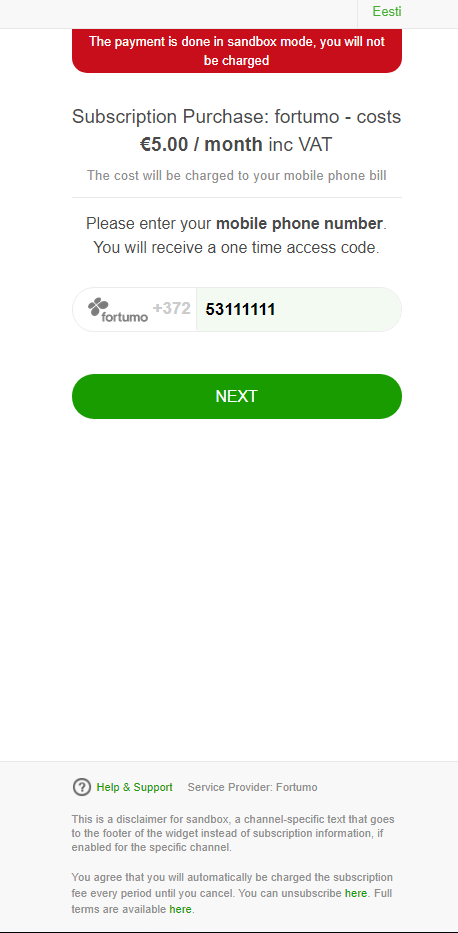
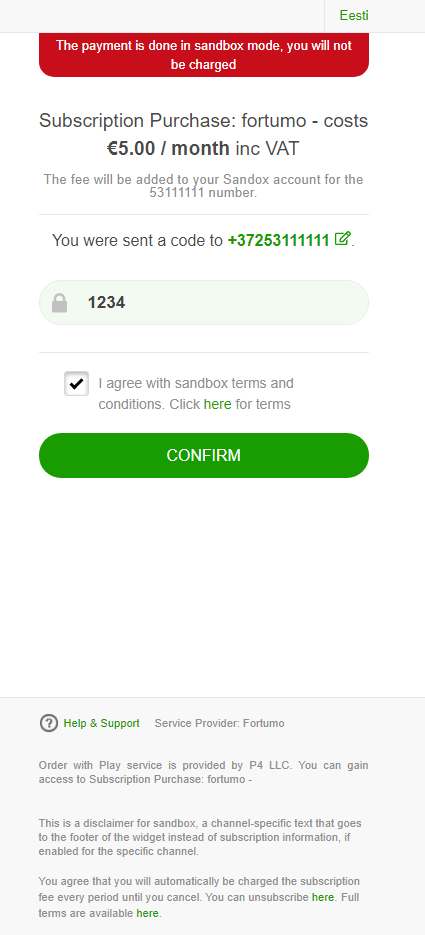
The customer will then perform any necessary authorisation required by the Carrier such as responding to an SMS, or entering an OTP parameter into the Fortumo page before being presented with the confirmation page.
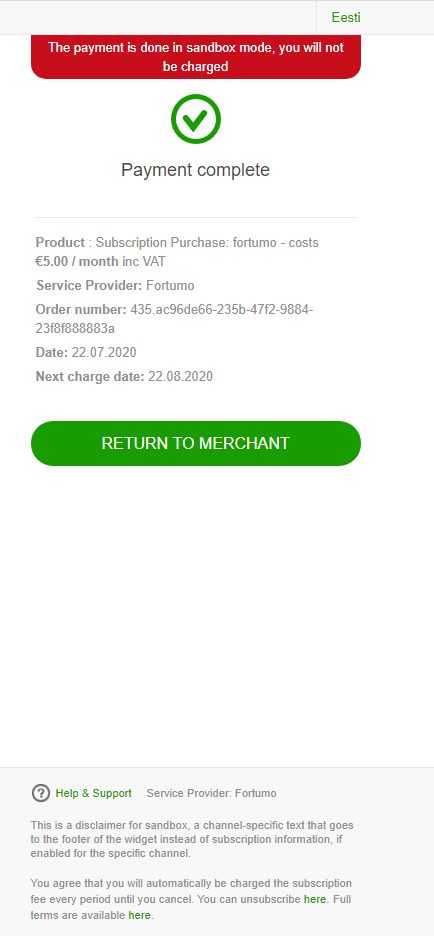
If the purchase request was successfully completed Fortumo will redirect the customer to the redirect defined by the client and configured against the APC payment method within eSuite HQ, or passed within the asynchronousInitiationParameters of the API request.
If the purchase request was not successfully completed Fortumo will redirect the customer to the failure-redirect defined by the client and configured against the APC payment method within eSuite HQ, or passed within the asynchronousInitiationParameters of the API request.
Working Examples
Subscription purchases Direct:
- Subscription purchase: POST /accounts/{accountReference}/subscriptions
- Complete a Subscription purchase: PATCH /accounts/{accountReference}/subscriptions
Subscription purchases Workflows:
- Subscription Configuration: POST /api/workflows/configurations/subscriptions
- Subscription purchase: POST /api/workflows/purchases/subscriptions
- Complete a Subscription purchase: PATCH /api/workflows/purchases/subscriptions
Pre-defined Bundle purchases:
- Bundle purchase: POST /accounts/{accountReference}/subscriptions
- Prerequisites: Create address, Create delivery information, Get list of available bundles
- Complete a Bundle purchase: PATCH /accounts/{accountReference}/subscriptions
Ad-hoc Bundle purchases:
- Bundle purchase: POST /accounts/{accountReference}/subscriptions
- Prerequisites: Create address, Create delivery information, Create Cart, Link the Cart to the Bundle Contract, Add items to the Cart
- Complete a Bundle purchase: PATCH /accounts/{accountReference}/subscriptions
Current Restrictions
- Subscription or Bundle purchases with a Future dated start date are not supported.
- Product purchases via the /api/workflows/purchases/products are not supported.
- Adhoc Payments via the /api/accounts/{accountReference}/payments are not supported.
- Misc Payments via the /api/workflows/purchases/miscellaneous-charge are not supported
- Service Credit purchases via the /api/workflows/purchases/service-credits are not supported
- Service Credit purchases via the /api/accounts/{accountReference}/service-credits are not supported
- Virtual Terminal does not support purchases via Fortumo Hosted DCB.
- Partial refunds initiated from eSuite HQ or eSuite REST APIs are not supported.
- Refunds or Chargebacks initiated via Fortumo or the customers Carrier are not supported.
- Resubscribe requests initiated from eSuite HQ or eSuite REST APIs are not supported.
- Change Subscription requests initiated from eSuite HQ or eSuite REST APIs are not supported.
- Fortumo Hosted DCB is not available in the latest version of the eSuite SDK.
- Fortumo only technically supports a soft cancel since a partial refund cannot be initiated for the remainder of the paid for period. However eSuite does allow clients to override this behaviour with a hard cancel process and immediate removal of the eSuite entitlement if required.
- Offers applied after the initial purchase request are not supported.
Configuration
MPP Global can manage the APC configuration within eSuite that controls whether Fortumo Hosted DCB is available to a client eSuite account, and the necessary supported functionality options. Once enabled for a client, you can select the payment method to be available as an option for each individual eSuite service or contract within eSuite HQ. Fortumo Hosted DCB does support an Optimistic or Pessimistic workflow, but since this payment method supports subscription purchases, the configuration is recommended to use the Optimistic approach.
Note it is critical the paymentMethod parameter passed in the eSuite REST API requests matches the exact spelling of the APC payment method Name that has been configured for your eSuite account (i.e. fortumoDCB).
Setup Checklist
- Please reach out to your Account Manager to discuss commercial implications and to enable this payment method within you eSuite account.
- An agreement with Fortumo will need to be completed, and the necessary Fortumo account information shared with MPP Global:
- merchant_id - The merchant ID provided by Fortumo to the client.
- private_key - The key used by eSuite to encrypt the JWT signature within the header of requests sent to Fortumo, and provided by the Fortumo dashboard.
- public_key - The key used by eSuite to decrypt the JWT signature within the header of responses from Fortumo, and provided by the Fortumo dashboard.
- The MPP Global Support team can assist you with the necessary configuration to setup Fortumo Checkout as an available payment method against your eSuite which will include:
- Payment Provider Info:
- PaymentSubsmissionPeriod - By default this is set to 1 day, so that renewal Orders are generated in a Waiting status ahead of the subscription expiry date.
- unsubscription_redirect - This is the URL that a end user is redirected to on the client side, when they follow the unsubscribe mechanism provided by Fortumo.
- Client Preferences:
- redirect - The default URL that an end user is redirected to on the client side, when an initial purchase is successfully completed via the Fortumo Hosted DCB page.
- failure-redirect - The default URL that an end user is redirected to on the client side, when an initial purchase fails or is abandoned via the Fortumo Hosted DCB page.
- paymentRetries - By default this is set to 2 days, so that the grace period and retry process within Fortumo is set to the recommended amount of 48 hours.
- Payment Provider Info:
- As well as the static and default values that can be set within the APC Configuration, it is also possible, and in some cases required to pass some parameters within the eSuite API request to be able to more dynamically control the behaviour of the interaction with Fortumo:
- asynchronousInitiationParameters:
- redirect - If provided this will overwrite the default value provided in the Client Preferences.
- failure-redirect - If provided this will overwrite the default value provided in the Client Preferences.
- country_code - A mandatory parameter that specifies the country of your consumer's carrier and is the 2 digit country ISO code.
- channel_code - An optional parameter that specifies the channel/carrier that your consumer is using for completing a payment if you want to restrict the available options.
- asynchronousInitiationParameters:
- Once enabled Fortumo Hosted DCB should be available for recurring and non-recurring subscription purchase scenarios.
- To support Fortumo cancellations, the client must a service update handler Url configured within each Service in eSuite HQ, or configured within the APC Configuration
- accept the Default V4 service update handler configured
- To support cancellations within Fortumo Hosted DCB, the client must have a service update handler Url configured within each relevant Service in eSuite HQ, or configured by default within the APC Configuration. The Default V4 version of the service update handler will also need to be set by MPP Global Support for eSuite to be able to update the Fortumo Hosted DCB APC as the subscription update events occur.
Test Scenarios
By default a client UAT environment will be configured with MPP Globals own sandbox credentials and configuration so that you can perform integration testing with eSuite. If you would prefer to update your Fortumo settings to your own client specific account details as provided by Fortumo directly, please contact the MPP Global Support team to assist with those changes.
When performing initial purchases with Fortumo Hosted DCB you can use 53111111 as a phone number and then the pin will dictate the payment result.
- If you enter a PIN of 1234 the transaction will be successful, and the eSuite order updated to Completed.
- If you enter a PIN of 8111 the transaction will be failed, and the eSuite order updated to Unpaid.