


Boku Checkout
Allows customers to initiate one-off payments and purchases using their mobile phone billing account as the funding source.
Introduction
Boku is a leading Direct Carrier Billing (DCB) payment service provider that has access to many different Carriers all over the globe for allowing customers to make purchases via their mobile phone billing account. Boku actually has multiple integration types that support a range of one-off and recurring subscription type purchase scenarios, with each integration being tailored towards a particular use case. For this integration type of Boku Checkout the focus is on one-off payments and purchases, where the consumer can select to pay via Boku Checkout, enter their mobile phone number and then proceed through the necessary identity authorisation, and purchase completion steps within the Boku hosted payment pages.
Use Case
Where a customer wishes to make a one-off payment or purchase using their mobile phone billing account as the funding source for the payment.
Key Functions
- Customers can make one-off payments and purchases using their mobile phone number as the funding source for the payment.
- Boku Checkout uses the eSuite Alternative Payment Connector (APC) framework.
- Boku Checkout is an asynchronous payment method that presents the Boku hosted payment pages to capture the customers mobile phone number and complete the associated payment.
- Boku handles the authentication of the customer via an SMS message, One-Time Passcode (OTP) authorisation or some alternative authentication method to approve the payment.
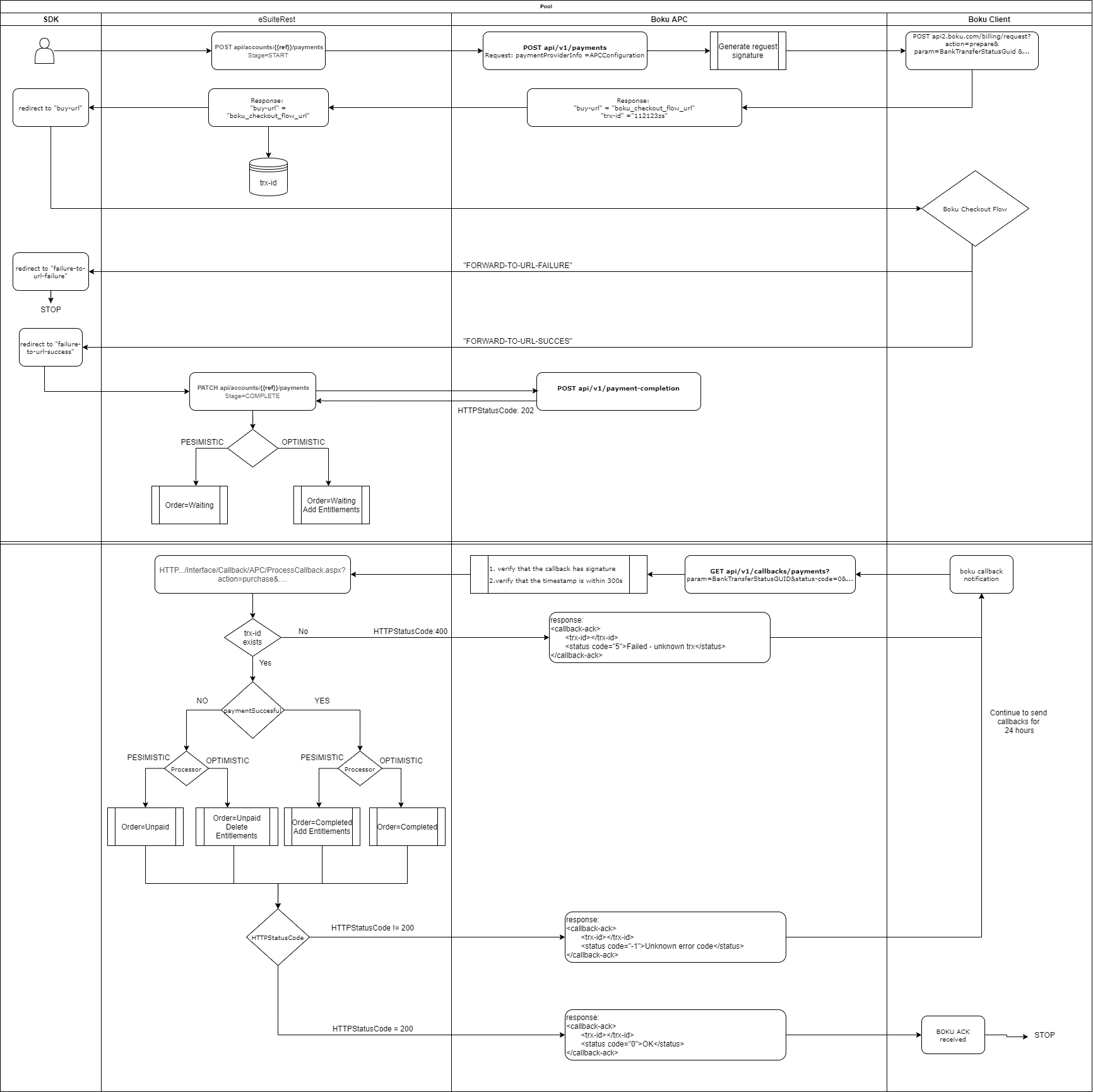
- One-Off Payments and Purchases can be initiated via the POST /api/accounts/{accountReference}/payments REST API endpoint.
- One-Off Payments and Purchases can be completed via the PATCH /api/accounts/{accountReference}/payment REST API endpoint.
- Boku Checkout uses a callback notification to eSuite to confirm the payment result (i.e. success or failure) and update the Order status to Completed, Unpaid or Cancelled.
- The PATCH request is mandatory to complete the two-step purchase process, and create the required subscription and entitlement records within eSuite.
- Optimistic Configuration option - creates entitlements upon the PATCH request, and removes if the Boku callback subsequently states the purchase was a failure.
- Pessimistic Configuration option - does not create entitlement until the subsequent Boku callback confirms the purchase was a success.
Hosted Payment Pages
Since Boku Checkout is an asynchronous payment method, eSuite will return the appropriate redirectUrl within the asynchronousProcessingParameters object in the initial POST /api/accounts/{accountReference}/payment API response. This redirectUrl will then take the customer to the Boku hosted payment pages where they can enter their mobile phone number and Carrier details to proceed with the payment.
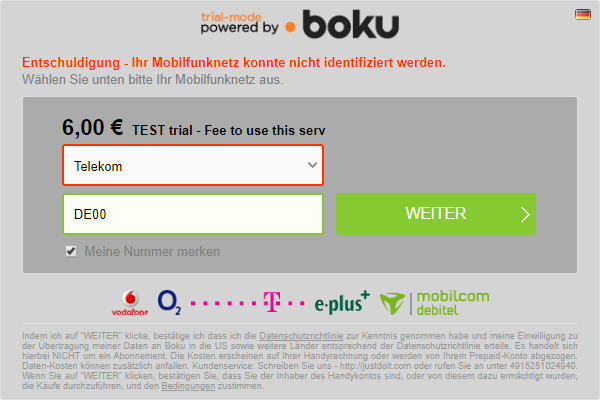
The customer will then perform any necessary authorisation required by the Carrier such as responding to an SMS, or entering an OTP parameter into the Boku page before being presented with the below confirmation page.
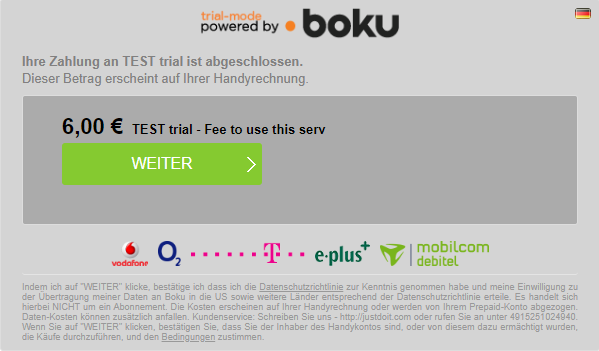
If the purchase request was successfully completed Boku will redirect the customer to the fwdurl defined by the client and configured against the APC payment method within eSuite HQ. As you will see this will also add some additional trx-id and param parameters to the end of the url.

If the purchase request was not successfully completed Boku will redirect the customer to the fail-fwdurl defined by the client and configured against the APC payment method within eSuite HQ. As you will see this will also not add the additional trx-id and param parameters to the end of the url, and thus is easily distinguishable from a successful transaction should a client wish to use the same base URL for a successful and a failed callback.
Working Examples
A one-off payment or purchase scenario.
Current Restrictions
- Subscription and Bundle purchases are not supported.
- Recurring payments tied to Subscriptions and Contracts are not supported.
- One-Click repeat payments using a tokenised Credential on File are not supported.
- Virtual Terminal does not support purchases via Boku Checkout.
- Full or Partial refunds initiated from eSuite HQ or eSuite REST APIs are not supported.
- Refunds or Chargebacks initiated via Boku or the customers Carrier are not supported.
- Boku Checkout is not available in the latest version of the eSuite SDK.
Configuration
MPP Global can manage the APC configuration within eSuite that controls whether Boku Checkout is available to a client eSuite account, and the necessary supported functionality options. Since this payment method only supports one-off payments or purchases there is no need to assign this as an available payment method for a specific eSuite Service or Contract. Boku Checkout does support an Optimistic or Pessimistic workflow, but since this payment method supports one-off purchases only, the configuration is recommended to use the Pessimistic approach.
Note it is critical the paymentMethod parameter passed in the eSuite REST API requests matches the exact spelling of the APC payment method Name that has been configured for your eSuite account (i.e. bokuCheckout).
Setup Checklist
- Please reach out to your Account Manager to discuss commercial implications and to enable this payment method within you eSuite account.
- An agreement with Boku will need to be completed, and the necessary Boku account information shared with MPP Global.
- partnerId - mandatory, it is client unique account id defined by Boku
- keyId - mandatory, a public key used to sign the requests sent between MPP Global and Boku
- sharedKey - mandatory, a private key used to sign the requests sent between MPP Global and Boku
- fwdurl - the redirect url Boku returns the customers browser to in case the checkout flow was successful
- fail-fwdurl - the redirect url Boku returns the customers browser to in case the checkout flow was not successful
- The MPP Global Support team can assist you with the necessary configuration to setup Boku Checkout as an available payment method against your eSuite.
- Once enabled Boku Checkout should be available for one-off or product purchase scenarios.