


3D Secure
This page details how 3D Secure is supported by the range of eSuite REST APIs for both version 1 and 2 workflows.
Overview
For an overview of 3D Secure version 1 and version 2, or details on how to enable 3D Secure into your workflow so that you can perform UAT testing, please refer to this 3D Secure page.
3D Secure Version 1
3D Secure version 1 supports Visa, Mastercard and American Express scheme card transactions.
Currently 3D Secure v1 is supported within the following eSuite REST APIs that are used to initiate purchase or payment transactions.
- POST api/accounts/{accountReference}/subscriptions
- POST api/accounts/{accountReference}/payments
- POST api/workflows/purchases/subscriptions
- POST api/workflows/purchases/products
- POST api/workflows/purchases/miscellaneous-charge
- POST api/workflows/purchases/service-credits
Recently MPP Global have also introduced 3D Secure v1 functionality into the below eSuite REST APIs to support the SCA requirements due for September 2019, and cater for other Customer Initiated Transaction (CIT) scenarios such as updating cards, and upgrading subscriptions.
- POST api/accounts/{accountReference}/payment-details/card
- POST api/accounts/{accountReference}/subscriptions/{subscriptionReference}/move
Workflow
Once 3D Secure v1 has been enabled for your Affiliate ID within eSuite, as well as your Acquirer MID supports 3D Secure transactions, you can begin the work involved to integrate and test this card holder authentication workflow.
- Ensure that you have a TermUrl configured. This is static Url that is used by eSuite to post notifications upon events during the 3D Secure v1 workflow.
- Call the standard POST of the purchase type you require i.e. POST api/workflows/purchases/products
- eSuite responds with required information within asynchronousProcessingParameters to continue the workflow (see below).

- Within an iFrame, the client then needs to post the values for the threeDSecureAcsUrl, the threeDSecureMD and threeDSecurePaReq values.
- This iFrame will present the Issuer ACS 3D Secure page to the cardholder, and ask them to complete a challenge if necessary.
- The challenge is then completed by the end user, and once complete the Issuer ACS will redirect the iFrame back to the TermUrl including the MD and PaRes values in the post.
- The client will detect the post back to the TermUrl within the iFrame as an event and capture the MD and PaRes values and close the iFrame.
- The client then needs to complete the process using the PATCH call passing in the MD and PaRes values.
- eSuite will respond to the PATCH call with the successful result of the transaction.
The below give some process diagram examples of the steps involved in the 3D Secure v1 workflow.
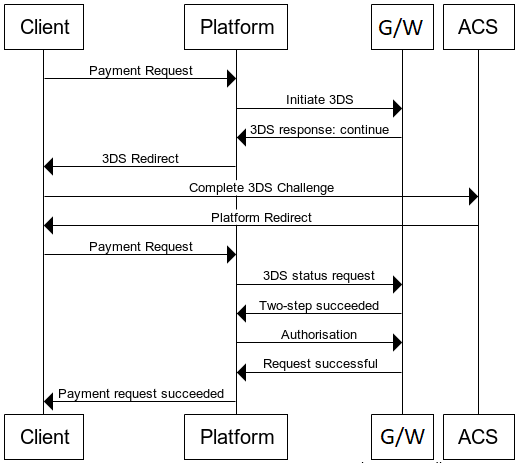
Workflow involved for a Successful 3D Secure V1 transaction
This scenario is as per the multi-step workflow detailed above and demonstrates the full end to end successful 3D Secure workflow.
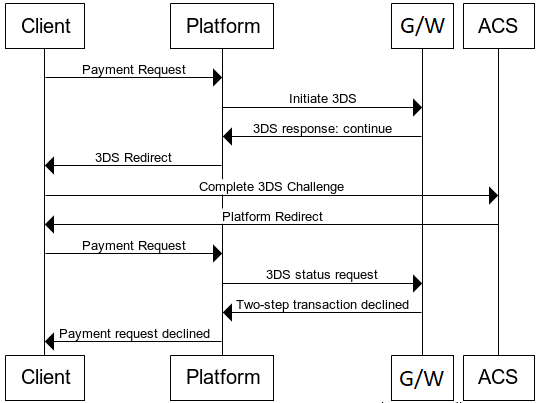
Workflow involved for a Failed 3D Secure v1 transaction
In this scenario the challenge completion by the user within the Issuer ACS 3D Secure page has been unsuccessful. Therefore since the transaction failed cardholder authentication, the response is returned from eSuite as a declined transaction.
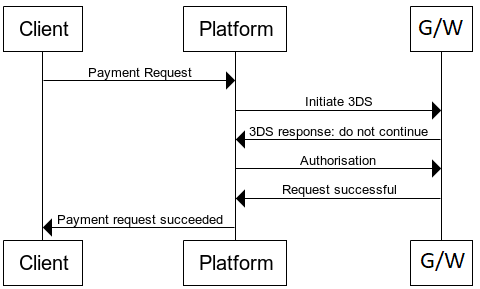
Workflow involved when an Issuer does not support 3D Secure v1.
In this scenario the initial request has returned from the Issuer that they do not support 3D Secure v1 and therefore the threeDSecureAcsUrl, the threeDSecureMD and threeDSecurePaReq values are not returned in the eSuite response, and the workflow can continue directly as if a standard authorisation (i.e. without 3D Secure being applied).
3D Secure Version 2
3D Secure version 2 is currently in development, and once completed the final specifications will be available on this page. In the interim it is possible to have advanced access to our Beta specifications for this service as they are developed by reviewing our 3D Secure 2.0 – Key Updates page.
3D Secure v2 supports Visa, Mastercard, American Express, Discover, JCB and UnionPay scheme card transactions.
3D Secure Test Card Details
If 3D Secure is enabled in UAT there are specific test cards that can be used to validate the scenarios expected as part of the 3D Secure workflows, both with successful or failed transaction results. Since 3D Secure version 1 and version 2 differ so much in their underlying behaviour, each service has its own applicable test cards to consider.
Version 1 Test Cards
| Scenario | Card Number | Card Type | Result |
|---|---|---|---|
| 1 | 4012001038443335 | Visa | Cardholder Not Enrolled - ECI 6 |
| 2 | 4012001038488884 | Visa | Unable to Verify Enrolment - ECI 7 |
| 3 | 4012001036298889 | Visa | Invalid response from Enrolment Server - ECI 7 |
| 4 | 4012001036853337 | Visa | Enrolled but invalid response from ACS - ECI 7 |
| 5 | 4012001037141112 | Visa | Successful Authentication - ECI 5 |
| 6 | 4012001037167778 | Visa | Authentication Attempt Acknowledged - ECI 6 |
| 7 | 4012001037461114 | Visa | Incorrect Password entered - ECI 7 |
| 8 | 4012001037484447 | Visa | Authentication Unavailable - ECI 7 |
| 9 | 4012001037490006 | Visa | Invalid Response from ACS - ECI - 7 |
Note that for clients testing 3D Secure in test mode within UAT, eSuite provides a mock ACS page as a stand-in for an actual Visa or MasterCard 3D Secure authentication page.