


Device Management (Client Side)
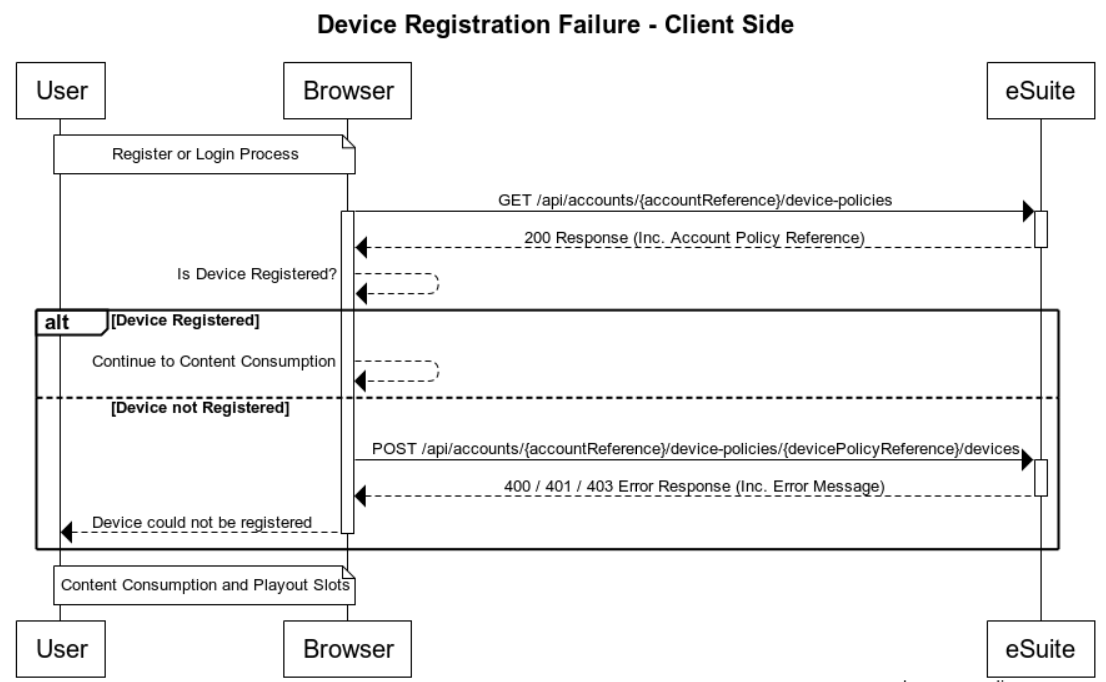
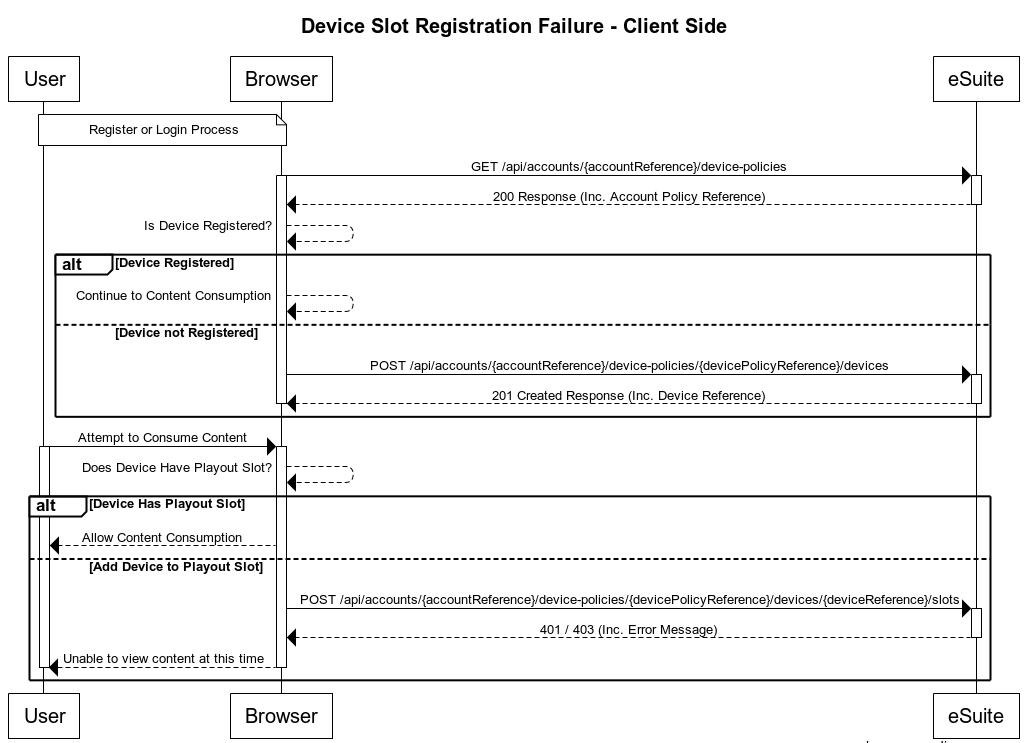
Device Management gives you more control and allows a broad, global model, with the scope to tailor access management using devices on a per customer basis. The aim is to allow device control that permeates through to your customers, and reduces the requirement on Customer Support teams. This section covers a number of User Cases, including an End to End example of Device Registration and Playout Slot reservation as well as covering failures that you may encounter.
Description
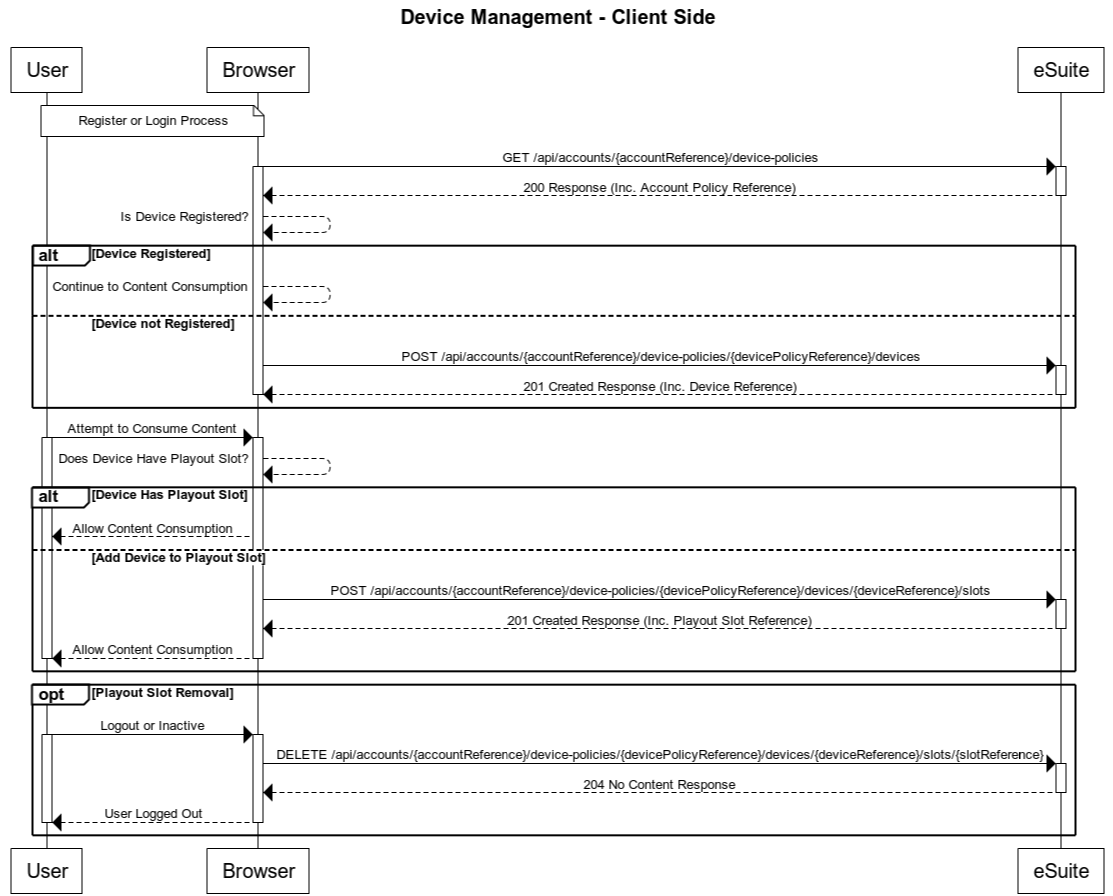
The diagrams below show the Client-Side implementation of Device Management. As apart of this user journey the user's device will be registered and a Playout slot allocated to the device, allowing the user to consume content. The Registration \ Authentication of the user is not covered in this flow, API workflow details relating to this can be found in our Registration section.
To find out more about Device Management, and how to configure in eSuite HQ, please view the Module Guide. Further to this, other related workflows are available under Account Management.
Workflows
Device & Slot Registration End to End
Device Registration Failure
Slot Reservation Failure
Authentication
As these are a client-side API being called then client-side authentication is used for the API. API authentication method details can be found here: https://supportstaging.mppglobal.com/technical/esuite-rest-api-support/authenticating/eSuite Authentication Prerequisite
To enable the client side applications to call the eSuite Client Side API's you will need to provide MPP Global with the following:- A list of Origins
- Token ID
API Documentation
Details on the APIs used in the above are detailed below. Device Management is only available from REST Version 11.0.0
Get the Account Device Policies
This API retrieves high level device policy information for example 'Allowed Devices' and 'Device Changes Allowed' along with all registered device details including reserved slot information.
Device Management can be controlled in two ways, Global Level or Account Level. When retrieving the Policy Reference from this endpoint, the devicePolicyReference field should always be used, the parentPolicyReference (only returned if the Device Policy is set at Account Level) is returned for informational purposes.
Further information on this API can be found here.
Register a Device
If based on the 'Get the Account Device Policies' response, it is found that the device in question does not yet exist, this endpoint should be used to register the device. Once created, the Device Reference will be returned as part of the Location response header. The reference is 18 characters in length and will be found at the end of the returned URL. An example is shown below
https://{restHost}/api/accounts/{accountReference}/device-policies/{devicePolicyReference}/devices/{deviceReference}
Further information on this API can be found here.
Register a Slot
Once a device has been registered, a play-out slot will need to be registered in order for the user to begin consuming content. Using the deviceReference, a slot can be reserved using this endpoint. Once created, the Slot Reference will be returned as part of the Location response header. The reference is 18 characters in length and will be found at the end of the returned URL. An example is shown below
https://{restHost}/api/accounts/{accountReference}/device-policies/{devicePolicyReference}/devices/{deviceReference}/slots/{slotReference}
Further information on this API can be found here.
Release a Slot
This endpoint will release a slot registered to an account device. An example of when this could be used is when the user logs out or is inactive for a certain period.
Further information on this API can be found here.