


Payment Suppression Windows
By holding off a payment during periods when banking failure rates are higher than average increases payment success and reduce churn.
Introduction
Card payment failure is often associated with specific days of the week, and hours of the day. For example, banks' fraud protection rules tend to be more strict during the early morning hours, when legitimate card owners are assumed likely to be asleep. Additionally, banks' infrastructure-maintenance schedules (designed across the industry to take advantage of the same, relatively quiet periods) may also result in payment failures.
An Enhanced Payment Window is the ability to specify, per country, optimal times a recurring payment transaction for a Subscription is to be presented for payment processing.
Subscriptions that are due to auto renew or retry, where the BIN of the payment card being used to process the payment transaction for the recurring Subscription is identified as being from a Country that does have an Enhanced Payment Window configured, will be forced to only attempt to submit payment transactions for renewals or retries, between the specified Payment Transaction Submission Times of the Enhanced Payment Window.
Subscriptions that are due to auto renew or retry, where BIN of the payment card being used to process the payment transaction for the recurring Subscription is identified as being from a Country that does not have an Enhanced Payment Window configured, will be forced to adhere to already existing functionality for Subscription renewal or retry for submitting payment transactions for renewals; and will not adhere to any Enhanced Payment Window logic.
Key Functions
- Optimized Payment Windows per Country
- Ability to specify Countries Enhanced Payment Windows are to be active against
- Automatic identification and presentation of a Card to an Enhanced Payment Window via BIN associated to Card
- Automatic adjustment of Subscription renewal to adhere to Enhanced Payment Window
- At point of initial purchase
- On Subscription renewal
- Entitlement access protection during Subscription movement to adhere to Enhanced Payment Window
- Compatibility with Retry logic ensuring Retries adhere to Enhanced Payment Window configuration
- Subscription renewal drift flexibility and auto snapback
Overview
For Enhanced Payment Windows, the following features set exists:
- Enhanced Payment Windows
- An Enhanced Payment Window, when configured against a Client, defines specific to the Country it is configured to control, the Payment Transaction Submission Times for BINs that are identified as being from the same Country, as determined by the BIN Lookup Table
- Enhanced Payment Window Client Application
- Enhanced Payment Window Application enables Enhanced Payment Windows to be setup against a Client
- Enhanced Payment Window Auto Renewal Behaviour
- Enhanced Payment Window Auto Renewal Adjustment Logic defines the behaviour of qualifying Subscriptions that are auto renewing
For Enhanced Payment Windows, the following process flow describes high-level behaviour:
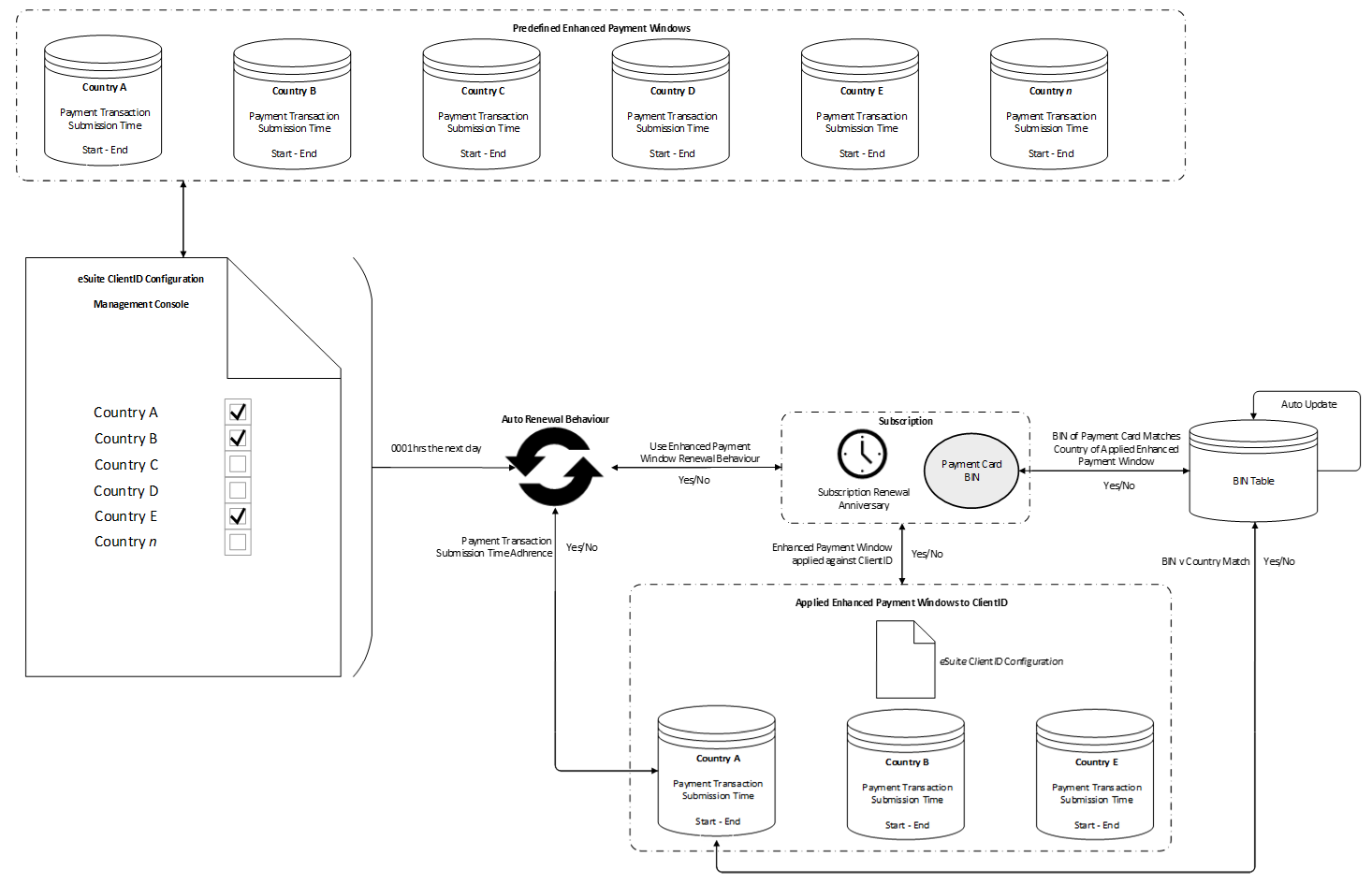
Use Cases
- No Enhanced Payment Window Configured
For Subscriptions, where the Country the Card associated to the Subscription is related, does not have an Enhanced Payment Window, normal Retry Logic will apply, and the renewal does not adhere to any Enhance Payment Window Logic. - Enhanced Payment Window Configured | Initial Purchase
At the point of initial purchase, where the Country the Card associated to the Subscription is related, does have an Enhanced Payment Window, the renewal of that Subscription will be automatically set to ensure renewal occurs within the Payment Transaction Submission Time for the Enhanced Payment Window it is associated. - Enhanced Payment Window Configured | Renewal
At the point of Subscription renewal, where the Country the Card associated to the Subscription is related, does have an Enhanced Payment Window, the renewal of that Subscription will occur within the Payment Transaction Submission Time for the Enhanced Payment Window it is associated.In circumstances where an Enhanced Payment Window is applied after a Subscription has already been purchased, at the point the Subscription is due to renew, the renewal will occur outside of the Payment Transaction Submission Time for the Enhanced Payment Window it is associated, but the renewal will be automatically set to ensure the next renewal occurs within the Payment Transaction Submission Time for the Enhanced Payment Window it is associated.
Current Restrictions
- User Interface to allow for bespoke Enhanced Payment Window configuration for ClientID within Management Console and/or eSuiteHQ
- Optimum time configuration
- BIN inclusion
- Automated Enhanced Payment Window configuration suggestion
- Ability to specify application of Enhanced Payment Window logic per Service and/or Product
- Reporting & analysis of success of Enhanced Payment Windows being applied
- Alternative Payment Methods
- BACS
- SEPA
- Application of differing Enhanced Payment Window logic depending on:
- Retry Rules
- Returned response codes
- Issuer
- Service and/or Product
- Currency
- Subscription Holidays – not compatible with Enhanced Payment Windows
Working Example
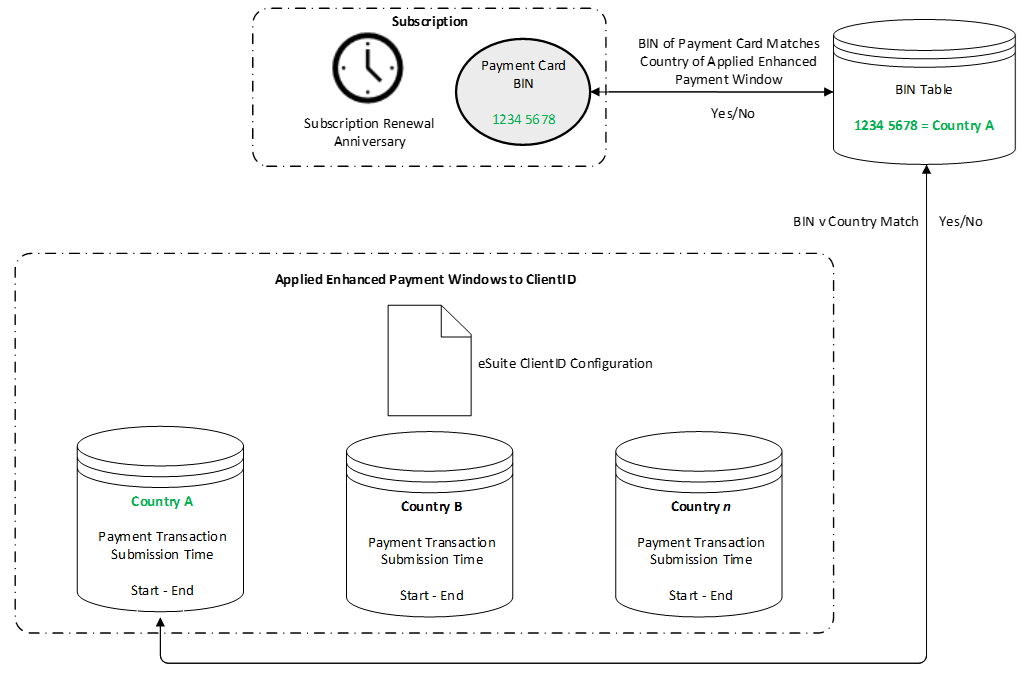
Subscription has payment card which has BIN: 1234 5678
Within the BIN Table: BIN 1234 5678 = Country A
Applied against the ClientID is an Enhanced Payment Window where the Country is: Country A
Subscriptions where the payment card has BIN 1234 5678, will adhere to the Enhanced Payment Window Auto Renewal behaviour of Country A.
Configuration
Enhanced Payment Windows needs to be configured in consultation with an MPP Global Payment Expert.
Working with MPP Global, a Payment Analysis will be conducted to establish the make up of a Payment Profile, which will identify target Countries that an Enhanced Payment Window should be configured for.
On agreement of the identified target Countries, MPP Global will then configure the Enhanced Payment Window on your behalf.
There is no requirement for you as the Client to make any amends to your integration or have any relationship with any other 3rd party.
After a period of 3 months, it is recommended that a follow-up Payment Analysis is conducted to review the impact of the configuration of the Enhanced Payment Window.
Setup Checklist
Contact your Account Manager to schedule a Payment Analysis