


Card Updater
Working with a unified banking scheme, we can automatically and seamlessly update your customers expiring payment cards, so they never fail a auto-renew due to card expiry.
Card Updater
eSuite's Card Updater helps to minimise loss of business due to customers’ payment cards becoming outdated, encouraging customer satisfaction, reducing churn figures and prolonging customer engagement.
eSuite is integrated into both the VISA Account Updater (VAU) and the MasterCard Automatic Billing Updater. Using these schemes, eSuite can obtain new customer payment details when they have been changed without the need for the customer to update any information themselves, thus allowing recurring payments to continue seamlessly as a result, maximising revenue and reducing churn where it would have otherwise been unavoidable without contacting said customer.
Card Updater can be used in conjunction with Retry Rules: so, after a predefined number of payment failures, the update process is initiated.
eSuite has periodical processes, depending on our clients’ acquiring bank(s), that securely send payment details which meet the selection criteria to each respective updater service to check for new payment details and, where updates have occurred, those details are then mirrored within eSuite.
Card Selection Criteria
eSuite allows a client to choose whether to send eligible Credit or Debit cards for update based on whether they’re linked to an active subscription managed within eSuite, or to include all cards matching the selection criteria outlined below regardless of whether they’re attached to a subscription. By allowing all eligible cards to be sent without considering whether a subscription link exists, a client may reduce friction for returning customers wishing to purchase a product via eSuite by having their latest card details on file without them having to enter the new details themselves.
The option to make this change can be accessed by an eSuite HQ Administrator for a client who has purchased the Retention and Recovery Module from MPP Global via the Settings Cog menu. A new option at the bottom of the page underneath the Payment Settings section, entitled ‘Card Updater Settings’, is now available, as seen below:

Clicking ‘Card Updater Settings’ will take the client to a page containing the below checkbox option: 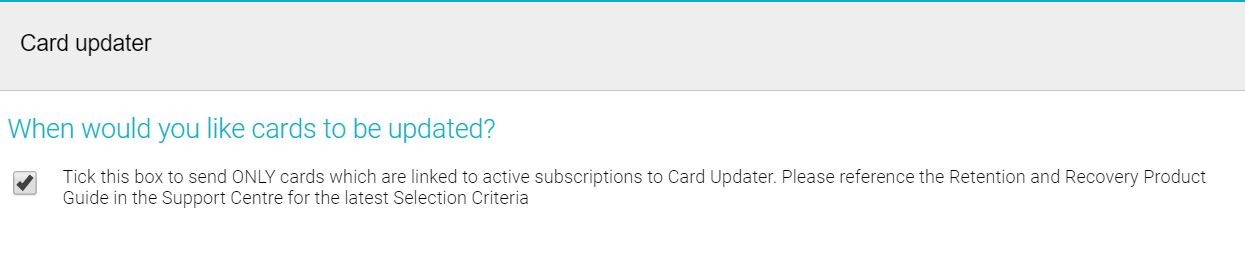
The box, and therefore the functionality to only send cards for update if they are tied to an active subscription meeting the Selection Criteria explained below, is checked by default. A client wishing to send all cards for update matching the criteria, regardless of whether they’re connected to a subscription, can uncheck the box and the following file(s) for that client sent via the Card Updater process will be affected.
- If the box is checked:A card eligible for repeat transactions will be selected IF:
- It belongs to an active eWallet
- Its expiry date falls within the period (NOW minus 12 MONTHS) to (NOW + 1 MONTH)
- For example, if the updater is run during August, the expiry window would be August last year to September this year, whole month inclusive.
AND
- It is the payment card associated with a customer subscription AND that subscription’s renewal date is (NOW minus 15 MINUTES) to (END OF THIS MONTH + 2 MONTHS)
- For example, if run at 15:00 on 31st August 2019, the subscription expiry window would be 14:45 on 31st August 2019 to 14:45 on 31st October 2019.
If the box is not checked, then only the first set of criteria outlining eWallet status and card expiry would be consulted.
Please note, if a card whose last transaction resulted in a LOST or STOLEN message being returned from the customer’s issuing bank, it will be included in the next available Card Update file for the client, bypassing the above selection criteria.
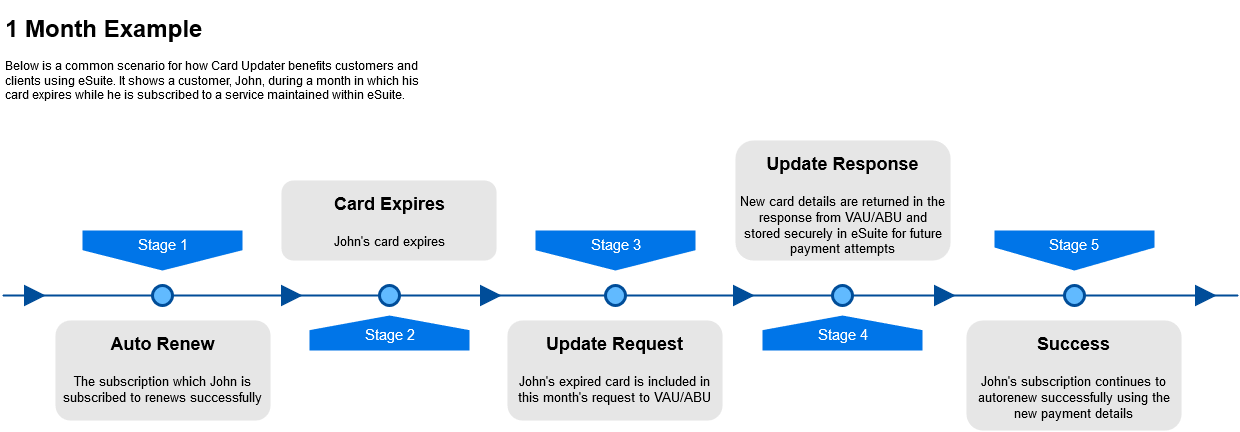
Example: 1 Month
Below is a common scenario for how Card Updater benefits customers and clients using eSuite. It shows a customer, John, during a month in which his card expires while he is subscribed to a subscription maintained within eSuite.
eSuite’s Card Updater service is integrated with several acquiring banks. For more information, please contact your Account Manager. Note that this service requires that the client use an acquiring bank with which eSuite has already integrated.