


Boku MMS
eSuite supports carrier billing globally through Boku MMS.
Integrating with Boku MMS
To use Boku Carrier Billing, clients must first create a merchant account with Boku as well as the carriers they want to support. Then, the client must supply the following to MPP Global:
| Key/Value | Description | optional |
|---|---|---|
| Merchant ID | Boku-Assigned MerchantID | No |
| API Key | Boku-Assigned API key | No |
| Password | Boku-Assigned Password | No |
| ServiceID | Boku-Assigned ServiceID | No |
| CallbackURL | The URL that Boku calls out to in order to update transaction statuses | No |
| SuccessURL | The URL to redirect a customer if the Boku payment journey is successful | No |
| FailURL | The URL to redirect a customer if the Boku payment journey is unsuccessful | No |
| BaseURL | The Base API endpoint to Boku | No |
| SecondaryBaseURL | The Secondary Base API endpoint to Boku | No |
The above will be provided by your Boku account. For more information, contact your Boku account manager.
Supported Product Types
Boku Carrier Billing supports the following product types:
- One off product purchase
- One off payment subscription
- Ongoing monthly recurring subscription
- Ongoing monthly recurring subscription with free trial period
- Monthly recurring subscription with a fixed number of renewals
- Monthly recurring subscription with a fixed end date
For information on how to configure services, see Creating A Service
Supported Carriers & Regions
As this is an continually updated list with Boku, which is not available in the public domain, if you require this information please email us where we will send the latest list of carriers and regions.
User Journey
Boku Carrier Billing is an asynchronous payment method and therefore requires end user input when making payments. When a customer is making a payment through Boku Carrier Billing, they will be asked to enter their mobile phone number on a boku hosted page.
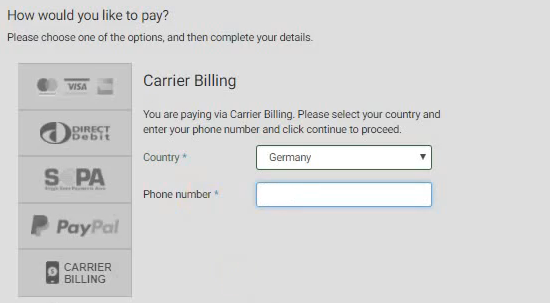
Once the customer has entered their mobile phone number, they will be taken to a code entry page and they will receive a one-time code via SMS, the user will be required to enter this code into the code entry page to complete the journey. eSuite will not be made aware of whether or not the payment was successful until Boku calls back and the customer is redirected to the appropriate success, error or cancel page. At this point, the payment journey is complete and eSuite will create the relevant order, subscription and/or entitlements upon successful payment.
Renewals
Boku Carrier Billing allows renewals to be called by eSuite at the point of a free trial ending, renewal or retry. As a result of this, eSuite will call out to Boku and request that they charge the customer the correct amount. Some carriers require a text message to be sent reminding the user that they are about to be charged. It is important that you check with your supported carriers whether or not they require this.
Refunds
Boku Carrier Billing handles refunds outside of eSuite. The customer is required to contact their carrier or Boku directly in order to refund an order. eSuite will only be made aware of a refund taking place after it has been completed and Boku send notification to eSuite (which occurs in a bulk process). Refunds cannot be managed from within eSuiteHQ or through the eSuite APIs.
Cancelling a Subscription
When cancelling a subscription with Carrier Billing, it is important to remember that not only does the eSuite subscription need to be cancelled, but the subscription with Boku needs to be cancelled as well. When using the eSuite cancellation APIs, it is possible for cancellation to fail on the side of the carrier. If this occurs, neither the eSuite nor Carrier subscriptions will be cancelled to prevent desynchronization between eSuite and Boku. We recommend you contact Boku for more information if this occurs.
Current Restrictions
As Boku Carrier Billing is an asynchronous payment method that occurs outside of eSuite, the following restrictions currently apply:
- Renewing Subscriptions can only be daily, monthly or yearly
- Upgrades and Downgrades are only supported at the end of the current subscription period. Immediate upgrade/downgrade is not supported
- Repeat payments are not supported for single payments, customer redirection will occur each time.
When configuring a service with Boku Carrier Billing as a payment method, the eSuiteHQ UI will disable the restricted sections to prevent invalid configurations.
eSuite API Documentation
The API calls follow the standard Asynchronous Payment Pattern with a payment method of Boku. Example calls can be found here: https://developer.mppglobal.com/#alternative-subscription-purchase